Case Study

A UX Designer Walks Into
a Mithai Shop

Building a custom order management tool for Vrindawan Sweets.

🏪 Family Business 🤖 AI-Assisted Build Live in Production
Scroll to read
Est. 2001  ·  Deoghar

A sweet shop
my father built
from scratch.

Vrindawan Sweets has been a neighbourhood institution for over 25 years — two outlets, one shared kitchen, and a customer base that spans three generations of the same families.

In 2024 I was working from home when I decided to take this on as a side project. I had time, some confidence, and a UX toolkit that I was certain would be useful.

25+ Years in business
2 Outlets
1 Shared kitchen
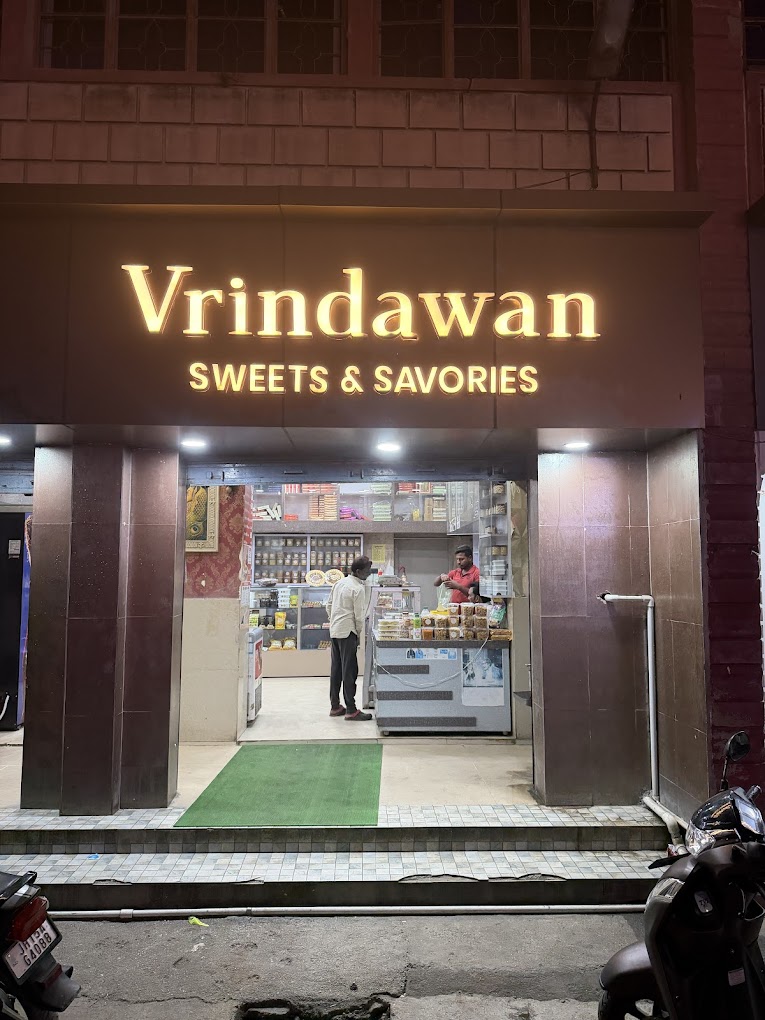
Vrindawan Sweets storefront
01

I was working from home when I decided to "fix" my dad's business. That word — fix — should have been the first warning sign. The business has been running for decades. It didn't need fixing. But I'm a UX designer, which means I am professionally trained to find problems worth solving. And so I looked at Vrindawan Sweets — two outlets, one shared kitchen, a few hundred loyal customers — and I saw inefficiency.

The plan, in my head, was clean. Buy a POS system. Set it up in a weekend. Train the manager in an afternoon. Become the next-generation son who modernized the family business with technology. I had seen enough "digital transformation" articles on LinkedIn to be dangerously confident.

I subscribed to Vyapar — a well-known retail POS — and handed it to Manoj ji, our store manager, on what I imagined would be a triumphant day.

It took him about twenty minutes.

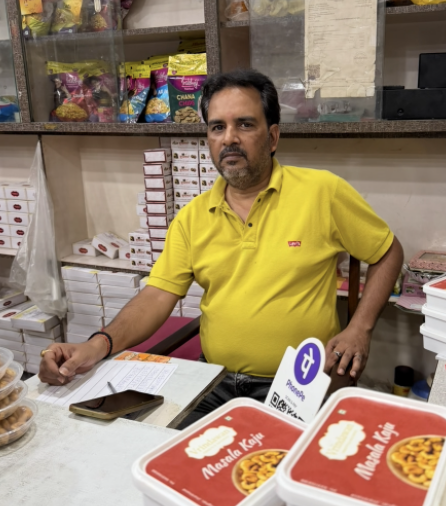
Manoj ji at the counter of Vrindawan Sweets
Manoj ji at the counter — the person whose single question reframed the entire project
Ye to theek hai, par isme orders ki billing kaise hogi?
"This is fine — but how will the order billing work in it?"
— Manoj ji, Store Manager, Vrindawan Sweets

That question ended my Vyapar era. I didn't have an answer, because I hadn't asked the right question at the start. I had assumed the problem was billing. The actual problem was a category of order that most POS systems don't fully handle at all.

02
35%
of revenue from advance orders
2
outlets, one shared kitchen
0
POS systems that handle this

Advance orders are bookings placed days or weeks before delivery — primarily for events. Weddings where the entire sweet selection is custom. School functions with dozens of identical snack boxes. Government celebrations with specific packaging specifications. Corporate gifting orders negotiated over phone.

These aren't items rung up at a counter. They are complex objects with moving parts:

The complexity of a single advance order
  • Multiple snack box configurations, each with a custom mix of sweets and namkeen
  • Special requests with negotiated extra charges ("silver foil on the Kaju Barfi")
  • Advance payments recorded at booking, balance collected at delivery
  • Bulk items alongside boxes — kilograms of specific sweets ordered separately
  • Notes about allergens, substitutions, and client preferences

No POS on the market could handle this level of customisability without feeling like rocket science. So Vrindawan ran the way it always had: orders in a diary, copied by hand onto paper the night before, passed to the kitchen at dawn.

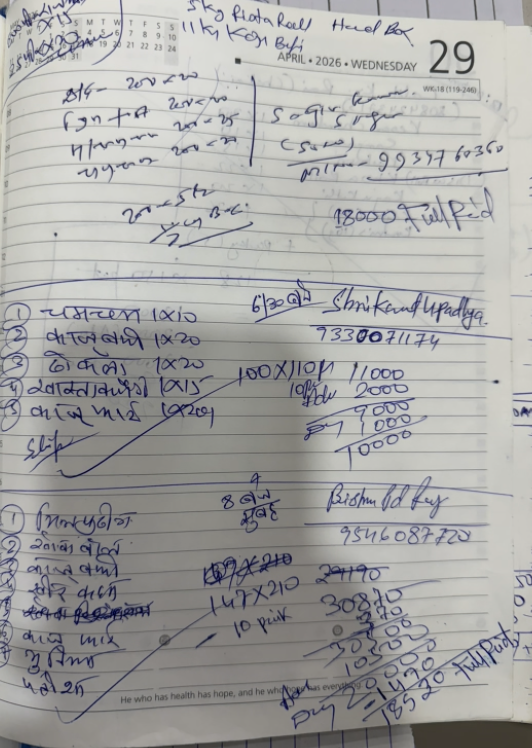
Handwritten advance order diary from Vrindawan Sweets
The original diary — every order, every customer, every balance, in ink. The system that worked for 40 years.
Market Reality Check

Why nothing on the shelf fit

After Manoj ji's question, I did what any designer would: I went back to the market. Vyapar wasn't the only option — there was Petpooja, Posist, DineOpen, and a handful of smaller tools. I read documentation, watched demo videos, and sat through a few sales calls.

Every tool was built for a different model of business. Restaurant POS systems assumed a menu with fixed prices and a dine-in flow. Billing and accounting tools like Vyapar assumed a product catalogue with GST codes. None of them had a concept of an advance order — a booking placed today, customised in detail, paid partially now, and delivered two weeks from Thursday.

The combination that Vrindawan actually needed — advance scheduling + template-based custom box builder + multi-outlet access control + Devanagari KOT printing — didn't exist in any single product. Some tools had one or two of these. None had all four.

Feature Vyapar Petpooja Posist DineOpen Vrindawan App
Advance order scheduling Partial Partial
Template-based snack box builder
Custom item composition per box
Per-outlet sequential order IDs Partial
Multi-outlet role-based access
Devanagari / Hindi KOT printing
Advance payment + balance tracking Partial Partial
Cross-outlet customer recognition Partial
Thermal KOT printing
Per-customer packaging flexibility
WhatsApp integration Partial
Offline-capable (PWA) Partial
Admin-only analytics dashboard Partial

I didn't build another mithai POS. I built the thing the shop didn't have.

03

I gave up trying to fit the business into someone else's software and went the other way: I sat at the shop. For weeks.

The output of that time was a requirements document built from two tools: user stories grouped by role, and an object-action table — every noun the staff used (order, box, item, outlet, customer, payment) mapped against every verb that touched them (create, edit, print, cancel, mark paid). For each intersection: who does this, when, and what happens next?

What I found confirmed what the diary already knew — the workflow was mostly correct. The sequencing of steps, the information required at each point, the hand-offs between counter and kitchen. The decades-old system had been refined by real use. My job was to make it digital without making it wrong.

Object–Action Table · Outlet Manager View
Object Create View Edit Remove Search Change Status Print Share
Order
Snack Box
Bulk Item
Menu Item
Payment
Customer
KOT
Calendar
Inventory
Detailed Object–Action Table
Every action available to the Outlet Manager — with entry point and outcome
Object Action Entry Point What Happens Outcome
OrderCreateFAB + in bottom nav4-step form: Customer → Build → Pricing → ReviewNew order saved with ORD-{outlet}-NNN ID; lands on Order Detail
View listOrders tabDate strip + status pills + searchFiltered list for manager's own outlet only
View detailTap any order rowSlide-up panel with full breakdownCustomer info, boxes, bulk items, payments, status, totals
Edit"Edit" in detail panelRe-opens 4-step form pre-populatedUpdates existing order; preserves order ID
Cancel"Cancel" in detail panelConfirm dialogStatus → Cancelled; left border turns grey; excluded from KOTs
Change statusStatus chips in detail panelTap Confirmed / Pending / CompletedMarking Completed auto-zeroes balance due
SearchSearch box on Orders tabType name, phone, or order IDDebounced live filter
Filter by dateDate strip / "Today" pillTap a dateList re-loads for that delivery date
Filter by statusStatus pillsTap All / Confirmed / Pending / Completed / CancelledIn-place filter
Print KOT🖨 EN or 🖨 हिं buttonOpens thermal print window (80mm)Kitchen token in English or Devanagari transliteration
Print day batch KOTDay-level KOT buttons on Orders tabAll non-cancelled orders for selected dateSingle print job, grouped by order
Print receiptReceipt button in detail panel80mm customer receipt windowItemised receipt with totals and payment summary
Share via WhatsAppWhatsApp button in detail panelBuilds message with order summaryOpens wa.me/91XXXXXXXXXX in new tab
Snack BoxAdd to order"Add Box" in Step 2New box row appearsEmpty box ready for composition; price auto-computed
Apply template"Use Template" in Step 2Picks from admin-curated listPre-fills name, items, price — detached copy, editable
Edit name / count / priceInline fields on box rowType in editable fieldsLive recalculation of order subtotal
Add item to boxItem picker sheet inside boxTap "+ Add Item"Item row added with qty stepper; price hint updates
Adjust item qty+/− stepper per itemTap to change units-per-boxBox price hint and order total update live
Remove item from box✕ on composition rowSingle-tap removeItem removed; box price recalculates
Remove entire box🗑 on box rowSingle-tap removeBox and all its items removed from draft
Bulk ItemAdd to order"Add Bulk Item" in Step 2New bulk row with item pickerEmpty row with qty, unit, rate fields
Edit qty / rateInline fields + steppersType or tap steppersLine total and order subtotal update live
Remove✕ on bulk rowSingle-tap removeRow removed, subtotal recalculates
Menu ItemView catalogueItem picker sheet in Step 2Searchable list of active items onlyBrowse items to add to box or bulk
SearchSearch bar in item pickerType item nameLive filter as you type
PaymentRecord"Record Payment" in order detailOverlay: amount, method, noteNew payment row added; balance due recalculated
Record at bookingStep 3 of order form (Pricing)Enter advance amount + payment typeSaved with order; first payment in history
View / DeleteOrder detail → Payments sectionList of all payments; 🗑 on each rowDelete confirms → payment removed, balance recalculated
CustomerLookup by phoneStep 1 of order form, on 10-digit entryAuto-trigger after phone field fillsIf known: shows ✓ Returning customer, auto-fills name
Recognise across outletsSame lookupPhone matched against all outletsName shown even if last ordered at a different outlet
KOTPrint per-order (EN)🖨 EN button in order detailThermal 80mm window in EnglishItems, qtys, customer name, delivery date/time, notes
Print per-order (Hindi)🖨 हिं button in order detailThermal 80mm window in DevanagariItem names transliterated — not translated
Quick KOT (ad-hoc)More → Quick KOTFreeform item + qty list builderPrints without creating an order
CalendarView monthCalendar tabGrid view of current monthDates with order counts for own outlet only
Navigate months‹ / › arrowsTap to change monthGrid re-loads with that month's counts
Open day / create orderTap any dateDay overlay with order list"+ New" pre-fills delivery date into order form
InventoryView capacity gridInventory tabItem × date gridShows daily capacity limits set by admin
Availability checkAutomatic in Step 2When item qty enteredWarning if order would exceed daily capacity
04

The menu catalogue already lived in a Google Sheet — every item, price, and category, maintained by my father for years. Rather than start from scratch, I connected it to AppSheet, Google's no-code app builder, and had something usable in a day. One week of trial with real orders was enough to confirm the workflow made sense — and to learn what it couldn't handle.

AppSheet showed the concept was sound. It also showed exactly where the edges were: custom box compositions, per-customer pricing flexibility, and a phone UI that felt like filing a tax return. That week earned the decision to build properly. The next version was a PWA built to last.

05

The first day of the kitchen trial went fine. The staff on duty could read English well enough. Most of our item names are transliterations — Kachori, Patisa, Chena Apple — so I assumed literacy would hold.

On day two, a different kitchen worker squinted at the printed KOT and said:

Babu, angrezi nahi padh paate hai.
Likh ke de do aap Hindi me.
"Sir, I can't read English. Please write it in Hindi for me."
— Kitchen Staff, Day 2 of the trial

The fix could have been translation. But translation was the wrong tool. Chena Apple doesn't translate — it's a name, not a concept. Run it through a translation engine and you might get "छेना सेब" — a word the kitchen staff would never recognise for something they make every day. The right answer was transliteration — phonetic conversion into Devanagari, the script they read fluently. The same word, two scripts, one source of truth.

The KOT now prints in both. English for the counter manager who types in English. Devanagari for the kitchen who reads in Hindi. That decision — transliterate, not translate — is the most culturally grounded design call in the entire product. I never would have made it without watching that moment happen.

Kitchen Order Token — Two Scripts, One System
The same order, printed for two different readers
English
VRINDAWAN SWEETS
KITCHEN ORDER TOKEN

DATE18/05/2026
ORDERORD-02-041
CUSTOMERSharma Ji
TYPESNACK BOX

📦 NASHTA PACKET × 50

ITEMTOTAL

Chena Apple100 pcs
Kaju Barfi50 pcs
Samosa100 pcs
Kachori50 pcs

Printed: 18/05/26 09:14
हिंदी
वृंदावन स्वीट्स
रसोई ऑर्डर टोकन

दिनांक18/05/2026
ऑर्डरORD-02-041
ग्राहकशर्मा जी
प्रकारनाश्ता पैकेट

📦 नाश्ता पैकेट × 50

वस्तुमात्रा

छेना एप्पल100 पीस
काजू बर्फी50 पीस
समोसा100 पीस
कचोरी50 पीस

मुद्रित: 18/05/26 09:14

The second lesson cost more time than the first. I had built a payments analytics dashboard — revenue trends, payment-type breakdowns, outlet comparisons. I was proud of it. The manager opened it once, looked at it, and never came back to it.

Watching him, I understood: it wasn't useless, it was intimidating. Every extra widget on a screen costs the user a unit of trust. He didn't want analytics. He needed to know which orders had to be ready tomorrow, and who hadn't paid yet. The dashboard answered different questions — mine, not his.

I ripped it out of the manager's view and parked it in the admin dashboard, visible only to the shop owner. That removal — of a feature I'd built and was proud of — was probably the most honest design decision in the project.

The Product
Three screens from the live app
Vrindawan SweetsOutlet 2
🖨
Today
Tomorrow
All
🎁
Sharma Ji Confirmed
18 May · Snack Box
ORD-02-041
₹4,200
📦
Gupta Wedding Advance
18 May · Mixed
ORD-02-042
₹18,500
🎁
DPS School Confirmed
18 May · Snack Box
ORD-02-043
₹11,000
📋
Orders
📅
Calendar
+
💰
Payments
More
← Back
New Order
👤 Customer
Phone
📞 98765 43210 ✓ Returning
Customer Name *
Sharma Ji
📦 Delivery
Delivery Date *
📅 18 May 2026
Outlet
🏪 Outlet 2 ▾
Next → Step 2
Vrindawan SweetsOutlet 2
🖨
May 2026
Su
Mo
Tu
We
Th
Fr
Sa
1
2
3
4
5
6
7
8
9
10
11
12
13
14
15
16
17
18
19
20
21
22
23
24
25
26
27
28
29
30
31
📋
Orders
📅
Calendar
+
💰
Payments
More
06

The app is in daily use at both outlets. It handles the parts of the business that no existing POS would touch.

📅
Advance Order Scheduling
Orders placed for future dates with full customisation — boxes, bulk items, special charges, notes.
🔐
Role-Based Access
Outlet managers see only their own orders. Admin sees everything. Same app, different realities.
📋
Bilingual KOT Printing
Kitchen Order Tokens in English or transliterated Devanagari — same item, the script the reader needs.
🔢
Sequential Order IDs
ORD-02-041 encodes outlet and sequence. Staff can say it aloud across a kitchen. Designed to be spoken.
📞
Cross-Outlet Customer Recognition
A returning customer is recognised by phone number at either outlet. No double data entry.
📦
Inventory Capacity Tracking
Each item has a daily capacity. The system flags overbooking before it becomes a kitchen problem.
Before
  • Orders written by hand in a diary
  • Night-before transcription to paper sheets
  • Kitchen reads handwritten text — errors from bad handwriting
  • No cross-outlet visibility
  • Payment tracking in a separate ledger
  • No record of previous orders per customer
After
  • Orders logged digitally at point of booking
  • KOT printed in under 10 seconds, any time
  • Devanagari script for kitchen — zero ambiguity
  • Admin sees all outlets in one view
  • Payment ledger attached to each order
  • Customer history loaded by phone number
Original handwritten order diary
Before — the diary
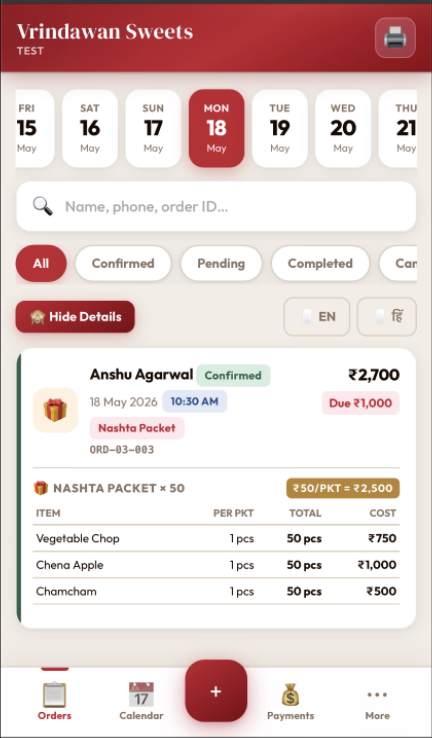
Vrindawan Sweets app order list screen
After — the app

The Reflection

What I thought vs. what was true

Phase What I thought What was true
Confidence A POS subscription will fix this The hardest part of the business isn't sales — it's scheduling
Crash Vyapar is a bad product No off-the-shelf product can know your customer's bookkeeping memory
Discovery I need to redesign the workflow The workflow is mostly right — the tools are what's missing
First Build Sheets is a temporary stack The constraints of a temporary stack teach you what the real product must survive
Trial The design is done The design starts the day you hand it to a user
Now I'm building software I'm replacing a 40-year-old paper system, and the paper had reasons
"It's simpler than I thought it would be."
— My dad, seeing the app for the first time. That was the entire point.

The single biggest shift wasn't technical. It was the order of operations. I started by trying to install a solution. I ended by spending weeks just watching.

If a UX designer's job is to make systems feel obvious in retrospect, this project taught me that the work begins by accepting that someone else's system is already obvious to them — and that the entire job is to honour what's already working before you "improve" anything.